

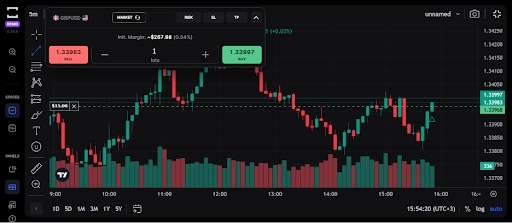
Trading technology has transformed dramatically in the past few years. What once required heavy software installations and complicated interfaces can now be done in just a few clicks from your browser. In 2025, one platform that’s setting new standards for simplicity and performance is the TradeLocker platform, a sleek, web-based trading environment designed for the modern trader.
Whether you’re brand new to online trading or transitioning from older platforms like MetaTrader 4, this guide will walk you through everything you need to know, from understanding how TradeLocker works to opening your first trade and using its features efficiently.
What Is the TradeLocker Platform?
TradeLocker is a next-generation online trading interface built for speed, precision, and accessibility. Unlike traditional software that needs installation, TradeLocker runs directly in your browser, meaning you can trade from any device. desktop, tablet, or smartphone, without downloads or updates.
It supports a wide variety of trading instruments, including
- Forex pairs (major, minor, and exotic)
- Commodities such as gold, silver, and oil
- Indices tracking major global markets
- Cryptocurrencies, including Bitcoin, Ethereum, and altcoins
TradeLocker has become a go-to platform for traders who value both performance and simplicity. It combines institutional-grade charting (through TradingView integration) with an intuitive interface that anyone can learn within minutes.
Why TradeLocker Is Outperforming Traditional Platforms
Platforms like MT4, MT5, and cTrader still dominate parts of the trading world, but their limitations are becoming clearer with time. They often require manual updates, rely on third-party plugins, and feel outdated compared to modern fintech standards.
Here’s why many traders are switching to TradeLocker:
- Browser-Based Access: No installation, no heavy software, no lag. Just log in and trade from anywhere.
- TradingView Charts: Integrated professional charting tools with hundreds of indicators and drawing features.
- Cross-Device Sync: Charts and settings stay consistent across desktop and mobile.
- Real-Time Execution: Lightning-fast order processing with minimal latency.
- Customizable Interface: You can personalize your workspace to fit your strategy and style.
The result? A smoother, faster, and more intuitive trading experience that fits seamlessly into the modern trader’s workflow.
Step-by-Step Guide: How to Use TradeLocker
Using TradeLocker is refreshingly simple once you understand the basics. Let’s break it down step by step.
Step 1: Choose a Reliable Broker
Before you can access the platform, you’ll need an account with a broker that supports TradeLocker. Your broker provides market access, liquidity, and order execution, so choosing the right one is essential.
Look for brokers that offer transparent spreads, fast withdrawals, and proper regulation. A regulated broker ensures fair pricing and fund safety.
For research and comparison, you can visit TradeLocker Brokers, a helpful resource listing brokers that currently support the platform.
For more insights into global forex markets and trading conditions, visit Bloomberg’s Forex Markets section.
Step 2: Log In and Explore the Dashboard
After registering with your broker, log in to your TradeLocker account. The main dashboard gives you an overview of:
- Your account balance and equity
- Open and pending orders
- Available trading instruments
- Market prices and spreads
- Real-time charting area
Spend a few minutes exploring before placing trades. You can switch between dark and light themes, resize chart panels, and adjust settings for a more personalized layout.
Step 3: Customize Your Charts
One of TradeLocker’s biggest strengths is its built-in TradingView chart integration. You can:
- Add technical indicators like RSI, MACD, Bollinger Bands, or Moving Averages.
- Draw trendlines, Fibonacci levels, or support/resistance zones.
- Switch between multiple timeframes, from 1-minute to monthly charts.
- Save chart templates for future use.
You can also open multiple charts simultaneously to monitor different assets at once, all from the same browser window.
Step 4: Place Your First Trade
Opening a trade on TradeLocker takes just a few clicks:
- Select your preferred trading instrument (e.g., EUR/USD or BTC/USD).
- Choose the order type: Market, Limit, or Stop.
- Enter your lot size, stop loss, and take profit levels.
- Click Buy (to go long) or Sell (to go short).
Your trade executes instantly, no lag, no extra confirmation screens. TradeLocker’s one-click trading system is especially popular among scalpers and short-term traders who need speed.
Step 5: Manage and Monitor Your Trades
Once your positions are open, you can track them in real time below your chart. TradeLocker allows you to:
- Modify stop-loss or take-profit levels by dragging them directly on the chart.
- Close trades individually or all at once.
- View profit/loss in both pips and currency value.
- Set alerts for key price levels.
This visual control gives traders a more natural way to manage risk and make adjustments as markets move.
Key TradeLocker Features You Should Know
Beyond its core functionality, TradeLocker comes loaded with smart tools and features that elevate the trading experience:
- Built-In Economic Calendar: Track global events that impact market volatility.
- Advanced Order Management: Set trailing stops and partial take-profits.
- Real-Time Notifications: Get alerts for order fills or margin changes.
- Multi-Account Access: Manage different accounts without logging out.
- Cloud Syncing: All your layouts and preferences are saved automatically.
These features make the TradeLocker trading setup feel lightweight yet powerful, ideal for traders who value efficiency.
Tips for Beginners Using TradeLocker
Starting out in trading can feel overwhelming, but TradeLocker makes the learning curve easier. Here are a few practical tips:
- Use Demo Mode First: Every broker offering TradeLocker provides a demo account. Use it to learn risk-free.
- Start Small: Begin with minimal capital until you develop consistency.
- Leverage Smartly: Don’t over-leverage; even advanced platforms can’t save bad money management.
- Set Alerts: Use price alerts to stay informed without staring at charts all day.
- Analyze Past Trades: Review trade history to spot mistakes and patterns.
Trading is a skill, and TradeLocker provides the perfect environment to practice and refine it.
Common Mistakes to Avoid on TradeLocker
Even with great tools, beginners often stumble on the same issues:
- Overtrading: Opening too many positions out of excitement.
- Ignoring Risk Management: Skipping stop-loss orders can wipe accounts quickly.
- Cluttered Workspaces: Too many indicators can create confusion.
- Chasing Volatility: Reacting emotionally to sudden price spikes instead of waiting for confirmation.
Remember, discipline and patience matter more than platform speed.
Why TradeLocker Fits Modern Traders
TradeLocker represents the future of online trading: web-based, AI-ready, and user-centric. In a world where traders demand real-time performance and mobile flexibility, it checks every box:
- Instant access from any device.
- No installations or downloads.
- Fast execution and transparent pricing.
- Integration with the most powerful charting system on the planet.
The platform fits seamlessly into today’s fintech ecosystem, where traders prioritize accessibility, data-driven decisions, and user-friendly tools.
Looking Ahead: The Future of TradeLocker
In 2025 and beyond, TradeLocker is expected to expand its features with deeper AI integration, automated risk management, and more broker partnerships. Its design philosophy, simple yet smart, positions it perfectly to become the global standard for traders who want control without complexity.
Final Thoughts
Learning how to use TradeLocker isn’t just about understanding the buttons; it’s about discovering a faster, more intuitive way to trade. The platform gives you all the tools you need, from advanced charting to instant execution, without the typical software hassles.
If you’re ready to explore this new wave of trading technology, start by choosing a regulated broker through TradeLocker Brokers and setting up your TradeLocker trading setup today.
With the right preparation, patience, and platform, 2025 could be your strongest trading year yet.
Learn more about trusted TradeLocker Brokers and start building your own modern trading setup today.