

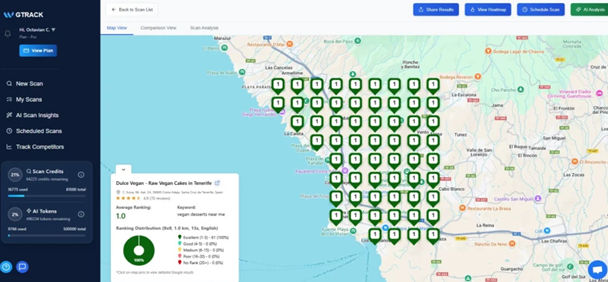
GTrack is an easy-to-use tool that helps businesses show up higher on Google Maps. It checks where your business ranks for specific words and places every day. You can see how you compare to nearby competitors and get ideas for better search words using AI. GTrack also gives you cool visuals like heatmaps to spot where your rankings are strong or weak. You get alerts if something changes on your Google Business Profile, like your name or category. Plus, you can create reports to share with your team or clients. GTrack makes it simple to track and improve your local SEO. The dashboard is clear, and you can let multiple people use it for teamwork. GTrack saves you time and helps you beat the competition.
GTrack Pros and Cons:
Pros
- Very easy to understand visual data.
- Automated scans and alerts save time.
- Competitor tracking offers strategic insights.
- Excellent for businesses focused on local SEO.
Cons
- The tool is highly specialized for Google Maps.
GTrack pricing Plan:
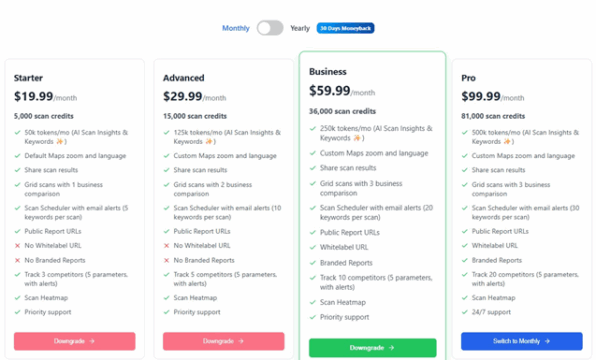
For users who prefer a subscription, GTrack offers monthly pricing plans. These options provide flexibility for different budgets and needs. The cost typically depends on your usage. This includes the number of keywords you track. It also includes the number of business profiles you monitor. You can scale your plan up or down as your business requirements change, ensuring you only pay for what you need.
Key Features and Capabilities
01. Grid-Based Rank Tracking
This feature shows your rankings on a grid. The grid is placed over your local area map. Each point on the grid shows a search. It reveals your rank at that exact spot. To be honest, this is very powerful. You see your visibility block by block. It helps you understand your local search footprint. You can easily spot where your business ranks high. You can also find areas needing improvement. The visual data is simple to understand. It removes the guesswork from local SEO. You know precisely where to focus your efforts. This targeted approach saves time and money. It makes your marketing much more effective. Another way to see it is as a performance map. You get a detailed view of your ranking landscape. This feature is a core part of what makes GTrack so useful for local businesses.
02. Google Maps View (Pins & Rankings)
This feature gives you a direct Google Maps view. It places pins on the map for your business. Each pin displays your current ranking for a keyword. The thing is, this makes data very easy to read. You see results just like a customer would. This view connects your rankings to real-world locations. You can zoom in and out of the map. You can check rankings for very specific streets or neighborhoods. Speaking of which, this helps you confirm your local SEO strategy is working. It provides clear, visual proof of your standing. You can quickly show this information to your team or clients. It makes reporting simple and direct. The visual nature of pins and rankings is very intuitive. It is better than looking at spreadsheets of data. This makes your analysis faster.
03. GBP Change Alerts (Name, Category)
Your Google Business Profile (GBP) is very important. Sometimes, changes happen without you knowing. This feature sends you instant alerts. It tells you if your business name changes. It also alerts you about category modifications. To be fair, this is a lifesaver. Unauthorized changes can hurt your rankings. Or a team member might make a mistake. These alerts help you act fast. You can correct any wrong information immediately. This protects your online reputation and SEO efforts. You maintain control over your business listing. The alerts give you peace of mind. You do not have to check your profile manually every day. The system does the work for you. This proactive monitoring is key to keeping a healthy and accurate online presence. Let’s face it, that’s a huge benefit.
04. AI Keyword Suggestions
Guess what? Finding the right keywords can be hard. This tool uses AI to suggest keywords for you. It analyzes your business and location. Then, it gives you a list of relevant keywords. These are terms that real customers are searching for. This saves you a lot of research time. The suggestions help you target the right audience. You can discover new keyword opportunities. This helps you expand your reach. You might find terms you never thought of. Using these AI suggestions can improve your rank. You will show up in more relevant local searches. The way I see it, this feature makes your SEO strategy smarter. It is like having an SEO expert helping you. It guides you to the words that matter most for your local success.
05. Accurate & Fast Scans
You need correct and quick data. This tool provides very accurate rank tracking. The scans are also very fast. You get up-to-date information without long waits. The accuracy means you can trust the data. You can make confident decisions based on the reports. Fast scans mean you can check your performance often. You can react quickly to any changes in your rankings. Come to think of it, this is great for a fast-moving market. The system works efficiently in the background. It gathers your ranking data without slowing you down. This reliable performance is key. It lets you focus on your strategy. You do not have to worry about the data’s quality. You just get the facts. This speed and precision make the tool very practical for daily use.
06. Interactive Heatmaps
Heatmaps give you a colorful view of your rankings. They use colors to show your performance. Green usually means you have a high rank. Red means you have a low rank. This visual tool makes complex data easy to see. You can spot your strongest and weakest areas at a glance. The heatmaps are interactive. You can click on different parts of the map. You can get more details about that specific area. This helps you analyze your performance deeply. You can see trends and patterns over time. For what it’s worth, this is very helpful for strategic planning. You can show these heatmaps to clients. They make your reports look professional. They tell a clear story about your local SEO progress. Heatmaps turn numbers into a picture you can use.
07. Multi-User Access
Many businesses have a team. This feature lets you add multiple users to one account. Your whole team can work together. You can give access to your marketing staff. You can also give it to your SEO agency. Each user can have their own login. You can manage permissions for each user. This improves collaboration. Everyone can see the same data. It helps keep your team on the same page. You can work together on your SEO strategy. Correct me if I’m wrong, but this makes managing projects easier. There is no need to share login details. It is more secure and organized. This feature is great for growing businesses. It is also perfect for agencies managing many clients. It makes the workflow smooth and efficient for everyone involved.
08. In-Depth Scan Analysis
This tool provides more than just your rank. It offers a deep analysis of each scan. You can see your average rank across an area. You can see your highest and lowest positions. The analysis breaks down your performance by keyword. This helps you understand which terms are working best. You can track your progress over time. The reports show you historical data. You can see if your rank is going up or down. Let me think, this detailed view is very important. It helps you measure the success of your SEO campaigns. You can see what is working and what is not. This information allows you to adjust your strategy. You can make data-driven decisions. This leads to better results and a higher return on investment.
09. Flexible Report Exports
Sharing your results is important. This tool lets you export reports in many ways. You can create reports for your team. You can create them for your clients. You can also create them for your own records. The reports are flexible. You can choose what data to include. This means you can customize reports for different needs. For example, a client might want a simple overview. Your marketing team might need more detail. You can easily create both. This flexibility saves you time. It also makes your reports more effective. You can present your data in a clear and professional way. This helps everyone understand your SEO performance. To be fair, good reporting is a key part of any successful marketing effort.
10. Competitor Tracking & Alerts
Knowing your competition is key. This feature lets you track your competitors. You can see their rankings on the same map as yours. This shows you how you stack up against them. You can identify their strengths and weaknesses. You can also get alerts about your competitors. The tool tells you if they make big moves in rankings. This information is very valuable. You can learn from their successes. You can also find opportunities where they are weak. This helps you build a smarter competitive strategy. Just between you and me, staying one step ahead is the goal. This feature gives you the insights to do that. It s like having a spy on your competitors. This keeps you informed and ready to act in the local market.
11. Scheduled Scans
Consistency is important in SEO. This feature lets you schedule your rank scans. You can set them to run automatically. You can choose to scan daily, weekly, or monthly. This means you always have fresh data. You do not have to log in and run scans manually. The system does it for you. This saves you a lot of time and effort. It ensures you never miss a ranking check. Regular data helps you spot trends. You can see how your rank changes over time. I see what you mean, this automation is powerful. It lets you focus on other parts of your business. You can trust that the tool is tracking your progress. This consistent monitoring is essential for long-term SEO success. It makes managing your local presence much easier.
12. Geo Grid Rank Tracker
This is the main function of the GTrack tool. The geo grid tracker is very precise. It shows your rank from different points in a city. This is different from a single, general rank. A business can rank number one next door. It could be on page three just a mile away. The geo grid shows you this reality. You get a true picture of your visibility. This detail is very important for local businesses. It helps you understand the customer’s search experience. You can see exactly where people can find you. And where they cannot. This knowledge helps you optimize for specific areas. You can improve your visibility where it matters most. This feature gives you the local intelligence you need.
All things considered, GTrack is a strong tool. It is focused on one important job. That job is tracking your Google Maps rank. It does this job very well. The grid system and heatmaps provide amazing clarity. You can see exactly where you stand in your local market. The AppSumo lifetime deal makes it a very attractive offer. You get a powerful, specialized tool for a one-time price. If your business relies on local customers finding you on Google, this is a smart choice. At the end of the day, it helps you get more customers. It is a solid recommendation for any local business owner or marketer.