

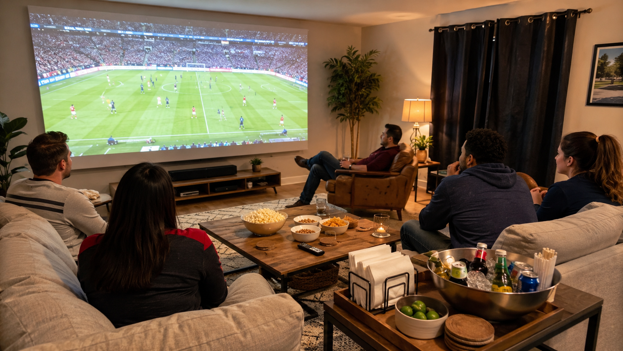
A great match day at home rarely happens by accident. The food may be casual and the guest list may be relaxed, but the room still needs a plan. When the screen is hard to see, the sound is unclear, or half the guests are stuck with bad sightlines, the energy drops quickly.
The good news is that a better setup does not have to be complicated. A simple checklist can help hosts prepare the room before guests arrive and avoid the small problems that become distracting once the match starts.
Check the View From Every Seat
Start by sitting in every likely seat. Can you read score graphics? Can you see the corners of the image? Is anyone too close, too far, or at a sharp angle? If the answer is yes, move chairs before the event starts. Guests are less likely to rearrange the room once they have food and drinks in hand.
A match day projector can make the screen easier for a group to share, but the layout still matters. Large images work best when the room gives people clear, comfortable views rather than forcing everyone into one perfect spot.
Test the Stream Before People Arrive
Nothing kills pregame excitement like troubleshooting a login screen. Open the app, confirm the account, test the broadcast, and check whether the stream is delayed or geo-restricted. If multiple services might carry the match, know the backup option.
Also test the remote control path. Can someone switch inputs without asking where everything is? Is the volume easy to adjust? A setup that feels obvious to the owner may confuse a guest, so keep the main controls simple.
Balance Light and Contrast
Match day often starts before the room is naturally dark. Close the curtains that need closing, but do not remove all social light if people are eating and moving around. The goal is a picture with enough contrast and a room with enough comfort.
For viewers who want a more premium setup, a high-end laser projector can be part of a room designed for stronger image performance. Still, the surrounding choices matter: screen placement, glare control, and lamp direction can improve or undermine the result.
Prepare the Sound
Sports audio has several layers: commentary, crowd noise, whistles, music, and commercials. Set the volume during live coverage, not during a quiet menu screen. Make sure dialogue is clear without making sudden crowd noise uncomfortable.
If the room is large or open, walk around while the sound is playing. Some areas may be too loud while others are unclear. Small adjustments to speaker placement or sound mode can make the experience better for everyone.
Plan Food Around the Screen
Food placement affects the viewing experience more than people expect. If snacks sit directly under the screen, guests may block the image every time they refill a plate. If drinks are too far away, people will move constantly. A side station often works better.
Keep napkins, trash, and coasters visible. These small details protect furniture and reduce interruptions. A host who does not have to search for supplies during the match gets to enjoy the event too.
Do a Final Five-Minute Reset
Before kickoff, clear cables, dim the right lights, check the stream, set the volume, and move extra chairs into place. Put the remote somewhere obvious. Then stop adjusting. Once the match starts, the room should feel ready.
A good checklist is not about perfection. It is about removing friction so the group can focus on the game. When everyone can see, hear, move, snack, and react comfortably, match day at home feels less like a compromise and more like the preferred way to watch.
The Best Checklist Is the One You Actually Use
A match day checklist should be short enough to repeat. Check the stream. Check the volume. Check the light. Check the seats. Check the snacks. Check the remote. Those six items solve most of the problems that interrupt home viewing. Anything more complicated may be ignored when guests are already arriving.
After a few events, the checklist becomes personal. Maybe one window always needs closing. Maybe one chair always blocks a walkway. Maybe a certain app always asks for a login at the worst time. Writing those lessons down makes the next match easier and helps the home setup improve over time.
Hosts can also keep a small post-game note. What worked? What felt awkward? Did people crowd one side of the room? Was the volume too high? Did the food table create traffic in front of the screen? These notes make the next event better without requiring a full redesign.
The goal is not to create a perfect sports venue. It is to create a home viewing setup that feels prepared, comfortable, and repeatable. A simple checklist helps the host enjoy the match too, which may be the most important measure of success.