

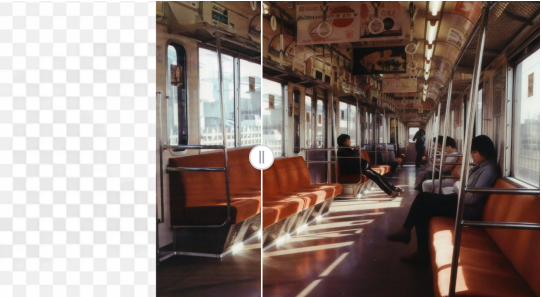
Ever taken the perfect photo only to realize the framing is too tight — cutting off a hand, missing part of the scenery, or leaving no room for text? It’s a familiar frustration for photographers, marketers, and content creators alike. While online tools like Image Editor can help with quick adjustments, VisualGPT’s AI Background Extender takes it a step further, letting you seamlessly expand your photos without distorting the subject or losing natural context.
This feature solves a pain point many users face — needing more “space” in an image that’s already perfect in every other way. Whether you’re preparing visuals for a website banner, social media post, or printed artwork, VisualGPT’s AI Background Extender intelligently fills the surrounding area to look as if it were always part of the original shot.
Reclaim the Edges of Your Photos
Imagine this: you’ve captured a stunning portrait, but the composition feels too cropped to use for a magazine layout. Or maybe you designed a beautiful flat lay, yet you need extra room for product text. That’s where VisualGPT comes in.
The AI Background Extender automatically analyzes your photo — its lighting, color tones, and textures — then recreates natural-looking surroundings that blend perfectly with your image. Trees continue where they were cut off. Ocean waves flow beyond the original frame. Room interiors extend smoothly without awkward edges.
What once required hours of cloning and manual editing can now be achieved in seconds, with a result so seamless that even a trained eye would struggle to spot the expansion.
Perfect for Creators, Designers, and Everyday Users
The versatility of VisualGPT’s AI Background Extender makes it useful across countless scenarios:
- Content creatorscan resize or reformat photos for different social platforms without cropping important details.
- Photographerscan rescue nearly perfect shots by extending the frame naturally.
- Designerscan create banners, posters, or thumbnails that require extra background space.
- E-commerce sellerscan add visual balance around product images for a cleaner presentation.
No matter your skill level, VisualGPT makes professional-looking composition possible — all online, without complicated software or design training.
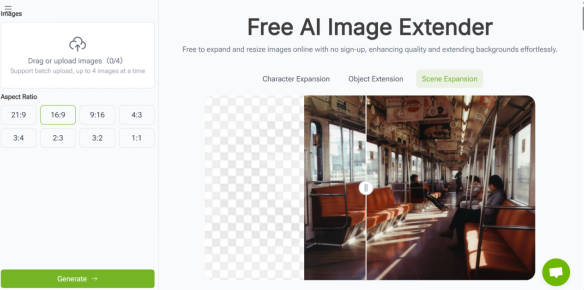
The Power of Realism and Control
Unlike basic “zoom-out” tools that stretch pixels, VisualGPT’s AI Background Extender rebuilds the missing parts of your image intelligently. It preserves shadows, depth, and environmental cues, so the added sections feel genuinely connected.
Users can also guide the expansion area — extending left, right, up, or down depending on their creative needs. For instance, a photographer might add sky above a mountain range, while a social media designer might extend the sides of a portrait to fit a horizontal layout. Each result looks organic, vibrant, and professionally balanced.
This realistic enhancement gives users the flexibility to adapt a single photo for multiple contexts — one image, endless possibilities.
Turning Constraints into Creativity
Every photo has potential beyond its borders, and VisualGPT’s AI Background Extender helps you unlock it. What used to be an editing limitation is now a creative advantage. You can experiment with framing, create storytelling compositions, or add breathing space around key subjects — all with just a few clicks.
For students, marketers, and photographers, this tool is more than a time-saver; it’s a creative companion that expands your visual possibilities.
Why Users Love VisualGPT
- No downloads or technical setup— use directly in your browser.
- Seamless blendingthat keeps your photo’s natural light and perspective.
- Flexible editing optionsfor all types of visuals.
- Perfect for professional or personal projects.
If you’ve ever wished your favorite photo had just a little more space, the VisualGPT AI Background Extender makes that wish a reality. Experience effortless expansion and stunning realism at https://visualgpt.io/ai-image-extender — where every image can finally breathe.