

Introduction
First of all, you don’t need to know everything about Kafka to start testing a data streaming application. That’s just a myth that you need to be an expert.
In this Post, we will quickly explore the bare minimum concepts you need to understand when working with Kafka in a data streaming application. You’ll also learn what aspects you can test that actually adds value to business.
- What exactly are the topics, partitions & offset ?
- How is Kafka different from other message queue(MQ) systems?
- Which bare minimum concepts should testers and QA engineers focus on?
- What should✅ you test and what you shouldn’t ❌?
- What are polling messages and commit?
1. What are Topics and Partitions?
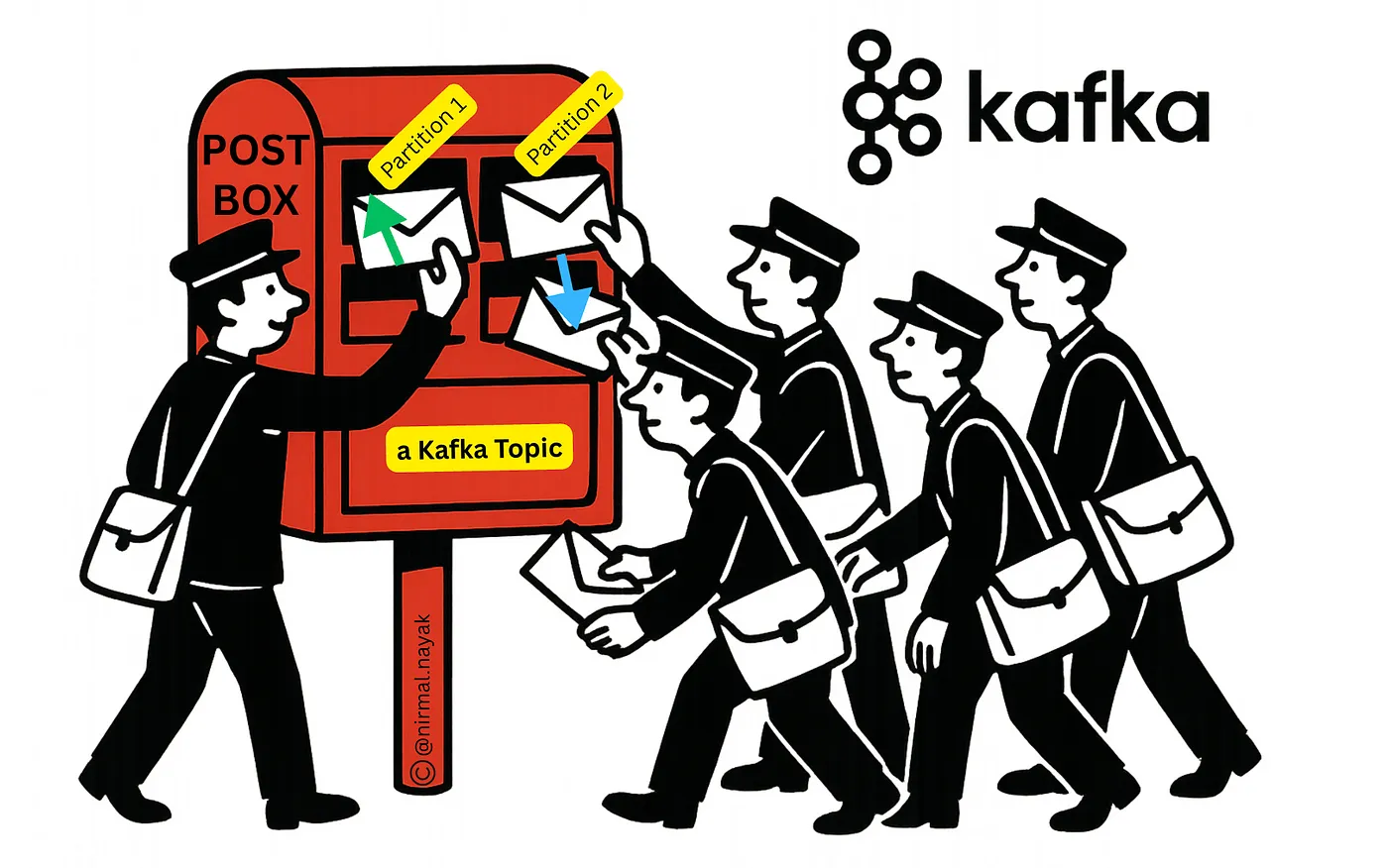
A Kafka topic is like a postbox where letters (messages) are dropped. The partitions are like having several postmen sorting and delivering those letters at the same time, so everything gets delivered faster.
In summary, a Topic is divided into a number of partitions for parallel processing.
Think of it this way:
- Topic = A post box
- Partitions = Different drawers or compartments inside the post box
- Message(s) = Letter(s)
- Produce = A person dropping a letter into one of the compartments
- Consume = A postman picking up a letter for sorting or processing
- Producer = Anyone who drops a letter into the post box
- Consumer = A postman who picks a letter from the post box
- Consumer Group = A team of postmen working together
2. How Kafka is Different from Other MQ Systems
Message Queues (MQs) like Kafka, ActiveMQ, and RabbitMQ all support asynchronous communication and decoupling between server and client.
Kafka, however, is uniquely designed as a distributed, parallel processing, partitioned, and replicated messaging system. It offers high-throughput capabilities, distinguishing it from simpler MQ systems(example: ActiveMQ etc).
3. Which Kafka Concepts (Bare Minimum) Should We Know?
Kafka’s data streaming and distributed nature introduce unique testing scenarios and challenges.
Here are the 12 fundamental concepts you need to understand, that will save you from feeling overwhelmed during dev or test:
- Broker
- Topic
- Partitions
- Record Formats
- Produce
- Consume
- Consumer Group
- Offsets
- Commit
- key
- value
- headers
Understanding where topics reside, how records are produced or consumed, and how listeners work is essential.
3.1. What Does a Broker Do?
A broker is a Kafka server. It allows producers to send messages and consumers to fetch messages by topic, partition, and offset.
3.2. What Is a Topic and Partitions?
In summary: Topics are divided into a number of partitions for parallel processing. We already covered that at the “Introduction” section, have a look.
3.3. Knowing the Record Formats
A record (or message) is written to or read from a topic. It can be in formats such as RAW, JSON, CSV, AVRO, etc.
Kafka records are stored as key-value pairs.
Examples:
JSON record wrapped with a key-value pair :
{
“key”: “1234”,
“value”: “Hello World”
}
JSON record view inside a Topic:
key : 10901,
value = A JSON record (see screenshot below).
key-value, here “key” is an Integer, value is JSON
Raw text record view inside a Topic:
key : 10901,
value = A text string record (see screenshot below) “My name is john…”.
key-value of a record, but no headers. Here, “key” is an Integer, value is free text
A record with a header:
{“x-ip-address” : “127.198…”} (see scheenshot below).
Headers are passed as “key-value” pairs.
3.4. Produce
Producing means writing records to a topic.
Example:
{
“key”: “1234”,
“value”: “Hello World”
}
3.5. Consume
Consuming means fetching records from one or more topics.
You should assert that the consumed record matches the expected one:
{
“key”: “1234”,
“value”: “Hello World”
}
You may receive multiple records depending on when the consumption starts.
3.6. What Exactly Should We Test in a Kafka Applications
Here’s what you can test and validate in your Data Pipeline:
- Whether a record has landed in the correct topic as per requirement
- Whether that record has landed in a specific partition as expected
- Whether the record has the correct timestamp, meaning it arrived in the correct sequence.
- The format of the record (e.g., AVRO, JSON, raw TEXT) was correct
- The count of records landed matched the expected number from the Source DB/File-system
- The intended invalid record landed in a Dead Letter Queue (DLQ)
- AVRO records were validated as per Schema Registry and contain Data as defined by the business
3.7. Consumer Group
A Kafka Consumer Group is a set of consumers that work together to read data from a Kafka topic. Each message in the topic is delivered to only one consumer in the group, allowing them to share the workload.
Think of a team of postmen working together to sort letters from a postbox. This helps process data in parallel.
As a tester, don’t worry too much about the ‘Consumer Group’. Most of the time, you only need to set it once — or not at all — during “manual testing”, and the beauty is the tool usually handles it for you. But it’s good to understand when you move to “automation”.
3.8. Offset
Kafka offset is a unique number that identifies the position of a message within a partition. It helps Kafka keep track of which messages have been read or processed. Each new message gets the next offset number in the sequence.
As a tester, do not worry too much about this “offset” as this is internal to Kafka how kafka manages it, and beauty is most of the time you won’t deal with it . But good to know.
4. What To Test, What Not To Test
What to test: As a manual tester or SDET, you must ensure you’re testing a Business logic or a transformation rule in the data streamed records. ✅
What not to test: At the same time, you must ensure you’re not unknowingly testing the Kafka system or its features. ❌
Example: Simply producing and consuming the same record without asserting any business logic may lead to a poor-quality test case.
5. Polling Messages & Commit
Polling Messages:
This means you’re(your tool or program) asking Kafka if there are any new messages to read from a topic.
Commit:
This means telling Kafka, “I’ve successfully processed these messages,” so it knows not to send them again to you(to your tool or program).
Conclusion
In this short tutorial, we covered the core concepts of Kafka and identified what can be tested “meaningfully” in a Kafka-based application so that it adds “value” to the QA process.
In the next tutorial I’ll walk you through a Business use case step by step — manually testing and validating the Business requirements, to show how exactly all these basic concepts hang together.
Keep in mind: These exact concepts are necessary for doing “automated testing” of Kafka applications too, which I will cover, in my next Post — that’s after the manual testing of Kafka — “Stop Wasting Hours: Kafka Testing Techniques That Actually Work” post.
Links
- Visit this GitHub page to setup Kafka in your laptop
- Follow this video tutorial, especially if you prefer watching to reading.
📹Video Guide: Explore the essential Kafka concepts in this free video tutorial. Subscribe free and watch along to build a solid understanding of Kafka for testing.