

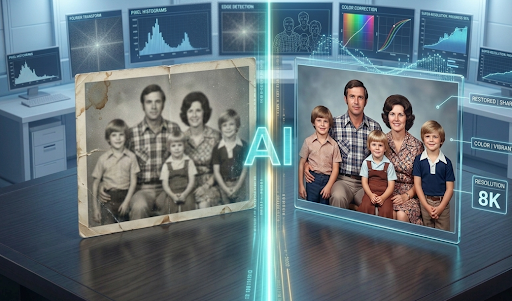
Have you ever found a perfect old photo of your grandparents, only to realize it’s so blurry you can barely see their faces? Or maybe you took a stunning sunset photo on an old phone, but when you try to print it, it looks like a bunch of messy colored squares?
In the past, a bad photo was a lost cause. But today, we have something that feels like actual magic: AI Image Enhancers.
In this guide, we are going to break down what these tools are, how they work in simple terms, and why they are changing the way we look at our digital memories.
What Exactly is an AI Image Enhancer?
To understand an AI Image Enhancer, think of a professional artist with a magnifying glass.
When you give a blurry photo to a normal computer program and ask it to make it bigger, the program just stretches the existing dots (called pixels). Imagine stretching a piece of bubblegum; it gets bigger, but it also gets thinner and see-through. That’s why old-fashioned zooming makes photos look “pixelated” or blocky.
AI (Artificial Intelligence) is different. Instead of just stretching the photo, the AI “thinks.” It has looked at millions of sharp photos before. When it sees a blurry eye or a fuzzy tree leaf in your photo, it knows what a sharp eye or a crisp leaf should look like. It then draws in the missing details.
How Does Photo Upscaling Work? (The Simple Version)
If you are in the 4th grade, you probably know about “Connect the Dots.”
Normal upscaling is like connecting the dots with a thick, messy crayon. AI upscaling is like having a robot that adds thousands of tiny new dots in exactly the right places before connecting them with a fine-tip pen.
1. Identifying the Noise
Every bad photo has “noise.” This isn’t sound; it’s the grainy, sandy look you see in dark photos. The AI first “cleans” the photo by removing this digital sand.
2. Sharpening the Edges
AI looks for the edges of objects—like the outline of a person’s face or the frame of a pair of glasses. It makes these lines crisp and straight.
3. Adding Texture
This is the coolest part. AI can add texture back in. If it sees a sweater, it adds the look of wool. If it sees a face, it adds the subtle texture of skin. This makes the photo look real, not like a cartoon.
Why Should You Care About Upscaling?
You might be wondering, “Why do I need this?” Well, there are several reasons why AI image enhancement is becoming a must-have tool for everyone, from students to business owners.
1. Saving Family History
Most of us have old physical photos that have been scanned. These scans are often low-quality. AI can take a photo from 1950 and make it look like it was taken yesterday. It’s like a time machine for your memories.
2. Better Social Media
If you are trying to grow an Instagram or a YouTube channel, your images need to look professional. Sharp, clear images get more likes and shares than blurry ones.
3. Printing Large Posters
If you have a small photo on your phone but want to print it as a big poster for your room, you need an upscaler. Without it, the poster will look like a Minecraft game. With AI, it stays sharp even when it’s huge.
4. Professional Work (E-commerce)
If you are selling something online, like a toy or a shirt, people want to see the details. AI enhancers help small business owners make their product photos look high-end without buying a $2,000 camera.
Common Terms You Should Know
When you start using these tools, you will see some big words. Let’s make them easy:
- Resolution: This is just a fancy word for how many “dots” are in your photo. More dots = more detail.
- Pixels: The tiny squares that make up a digital image.
- 2x, 4x, 8x: This tells you how much bigger the AI is making the photo. 4x means it’s making it four times larger than the original.
- Artifacts: No, not the ones in museums! In digital photos, artifacts are the weird, ugly marks or “glitches” that appear in bad quality images.
Top Benefits of Using AI Instead of Traditional Editing
Before AI, editors had to spend hours in Photoshop using a “Clone Stamp” or “Healing Brush.” It was hard work! Here is why AI is winning:
- Speed: What used to take a human 5 hours now takes an AI 5 seconds.
- Consistency: AI doesn’t get tired. It treats every pixel with the same level of care.
- Accessibility: You don’t need to be a computer genius. Most AI enhancers are “one-click” tools. You upload, click a button, and download the result.
Different Types of AI Enhancers
Not all AI is the same. Some are better at certain things than others.
A. Face Enhancers
These are specially trained to fix human faces. They focus on eyes, teeth, and hair. They are great for selfies and portraits.
B. Anime/Illustration Upscalers
If you like drawing or watching cartoons, these tools are for you. They focus on keeping colors bright and lines perfectly smooth.
C. Landscape Enhancers
These focus on trees, water, and clouds. They make nature photos look incredibly deep and vibrant.
How to Choose the Best AI Image Enhancer
If you go to Google and search for “AI Image Enhancer“ you will find hundreds of results. How do you pick the right one? Here is a checklist:
- Is it Free? Many tools offer a few free “credits.” Try them out before you pay.
- Is it Easy to Use? If the website looks too confusing, find another one. The best tools are simple.
- Privacy: Make sure the website says they won’t steal your photos.
- Preview Feature: Good tools let you see a “Before and After” slider so you can check the quality before downloading.
Step-by-Step: How to Upscale Your First Photo
If you have a photo ready, follow these simple steps:
- Select Your Tool: Choose a popular website or app (like Remini, Gigapixel, or Let’s Enhance).
- Upload: Click the “Upload” button and pick your blurry photo.
- Select Scale: Usually, 2x or 4x is enough. Going to 16x can sometimes make the photo look a bit “fake.”
- Wait for the Magic: Give the AI a few seconds to “think.”
- Download: Save your new, shiny photo to your device!
Is AI Image Enhancement “Cheating”?
Some people ask if it’s wrong to use AI to fix a photo. The answer is: it depends!
If you are using it to fix a blurry photo of your cat, it’s perfectly fine! It’s just a tool, like a paintbrush. However, in journalism or court cases, photos must stay exactly as they were taken. For 99% of us, AI is just a helpful friend that makes our memories look better.
The Future of AI Photography
We are just at the beginning. Soon, AI won’t just fix photos; it will be able to “un-crop” them. Imagine you took a photo of a dog, but you accidentally cut off its tail in the frame. Future AI will be able to look at the dog and “draw” the tail back in perfectly.
We are moving toward a world where no photo is ever “ruined.” Every mistake can be fixed with a bit of smart math.
Summary: Key Takeaways
- AI Image Enhancers don’t just stretch photos; they add new, smart pixels.
- They are perfect for old photos, social media, and printing.
- They save time and money compared to old-school editing.
- Even a 4th-grader can use them with just one click.
Final Thought
Your photos are your stories. They capture a moment in time that you can never go back to. Don’t let those moments stay blurry or dark. Whether it’s a picture of your favorite toy, your best friend, or a beautiful vacation, use AI to make it shine.
The world is high-definition—your memories should be too!
🔹 Explore more powerful file conversion and online utilities at AllFileTools –
🔹 For technical support, digital solutions, and expert services, visit LetDigitalFly IT Services –
🔹 Discover additional career and productivity resources at Resume Slip Builder –