

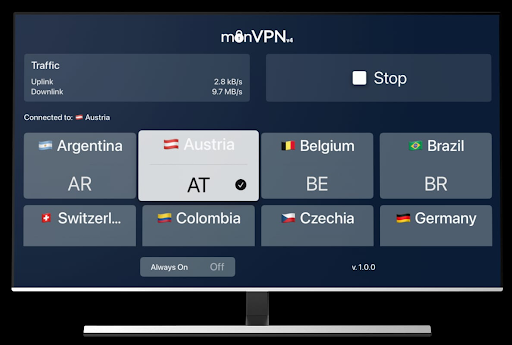
In today’s digital age, streaming content from around the world is easier than ever provided you have the right tools. One of the most powerful tools for unrestricted streaming is a VPN for streaming especially when using popular devices like Apple TV and Amazon Firestick. With the right simple to use VPN, you can access your favorite movies, shows, and sports events from anywhere in the world. In this guide, we’ll walk you through how to set up a VPN on Apple TV and Firestick and explain why monVPN is a great choice for this purpose.
Why Use a VPN for Streaming?
Before diving into the setup process, let’s understand why using a VPN is essential for streaming:
- Access Geo-Restricted Content: Many streaming platforms like Netflix, Hulu, BBC iPlayer, and Disney+ restrict content based on your location. A VPN changes your IP address, giving you access to a wide range of international content.
- Bypass Censorship: Live in a country where certain content is blocked? A VPN helps bypass those restrictions.
- Stay Secure Online: A VPN encrypts your internet traffic, keeping your data safe from hackers and prying eyes especially on public networks.
- Avoid ISP Throttling: Internet providers sometimes slow down your connection when you stream a lot. A VPN prevents this by hiding your activity.
Why Choose monVPN?
When it comes to choosing a VPN, reliability and speed matter the most. This is where monVPN stands out.
monVPN is a fast, trustworthy VPN service offering secure, no-logs connections with 1Gbps servers in over 30 countries. Trusted by users worldwide since 2010, it works reliably even in high-censorship regions and is available on all major platforms, including Windows, macOS, Android, iOS, routers, Apple TV, and Firestick.
Whether you’re a frequent traveler or just someone looking to unlock global entertainment from home, monVPN delivers top performance with easy-to-use apps.
New in tvOS 17: Apple TV Now Supports VPN Apps Natively
Until recently, Apple TV didn’t allow VPN apps, forcing users to rely on complicated workarounds like router setups or connection sharing. But that’s changed.
With tvOS 17 and newer, Apple TV now supports native VPN apps, making it possible to install and use a VPN directly from the App Store — no technical setup required.
monVPN: One of the First VPN Apps on Apple TV
Among the first to launch a dedicated VPN app for Apple TV, monVPN offers one of the most straightforward and user-friendly experiences available. The app is built specifically for tvOS, with performance, ease of use, and privacy in mind.
How to Set Up monVPN on Apple TV (tvOS 17+)
- Turn on your Apple TV and open the App Store
- Search for monVPN
- Download and install the app
- Select a VPN server (e.g., UK, USA, France) and connect
- Enjoy unrestricted streaming directly on your Apple TV
That’s it — no extra devices, no manual configuration. Just open the app and stream.
How to Set Up VPN on Firestick
Unlike Apple TV, Firestick does support VPN apps, making the process much easier.
Steps to Install monVPN on Firestick:
- Go to your Firestick home screen
- Open the Amazon App Store
- Search for monVPN
- Download and install the app
- Open monVPN and log in with your account
- Select a server (e.g., USA, UK, Canada) and connect
- Start streaming your favorite content with no restrictions!
With monVPN, you can even mark your favorite servers for quick access and enjoy smooth, high-speed connections with minimal buffering.
Benefits of Using monVPN on Apple TV and Firestick
Here are a few reasons why monVPN is the ideal VPN for Apple TV and Firestick:
- 1Gbps Speed Servers: Enjoy HD and 4K streaming without lag.
- No Logs Policy: Your browsing and streaming activities remain 100% private.
- User-Friendly Interface: Even beginners find it simple to use VPN with monVPN.
- Multi-Platform Support: Use one account across multiple devices.
- Works in High-Censorship Countries: Great for users in regions like China, UAE, Iran, and more.
Final Thoughts
Streaming without borders is no longer a dream it’s a reality with the right VPN. Whether you’re unlocking a foreign Netflix library, watching exclusive BBC content, or simply maintaining your privacy, setting up a VPN on Apple TV or Firestick is essential. monVPN makes the process easy, secure, and incredibly fast. With over a decade of experience and a global reputation, it’s the perfect companion for your streaming adventures. So why wait? Set up your VPN today and stream anything, anytime no limits, no worries.