

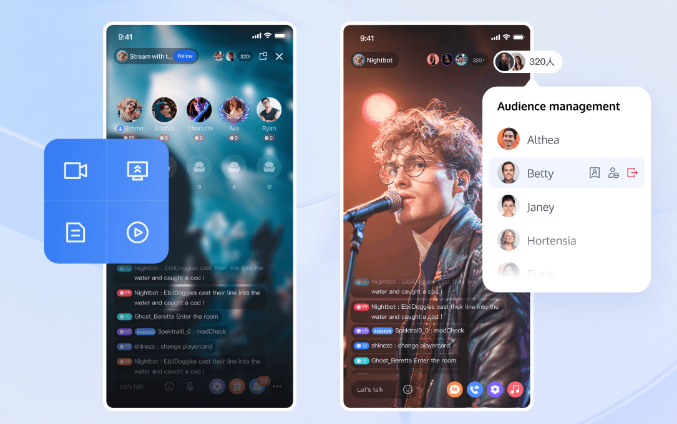
The world of live streaming has witnessed unparalleled growth, shaping how content is delivered and consumed globally. A robust and efficient streaming solution is essential to meet the demand for high-quality, real-time interaction across various platforms. One integral component that facilitates this is the Live Streaming SDK. This vital tool empowers developers to embed live streaming functionalities in their applications seamlessly. Through a comprehensive suite of features, from ultra-low latency to cross-platform compatibility, a Live Streaming SDK ensures that content creators and their audiences are always connected, without any notable delays or interruptions. This blog aims to delve into the definition, key features, functionality, and the benefits of integrating a Live Streaming SDK into your streaming solution, providing an all-encompassing guide to utilize this powerful tool effectively.

What Is a Live Streaming SDK?
A Live Streaming SDK (Software Development Kit) is a toolkit that developers use to integrate live streaming capabilities into their applications or platforms. It comprises a set of software development tools, libraries, code samples, processes, and documentation that facilitates the creation of live streaming functionalities. Essentially, it acts as an enabler, embedding the core features necessary for live streaming without the need to build everything from scratch. Developers can leverage these pre-built components to save time and resources, focusing more on the customization and unique aspects of their application. Live streaming SDKs are designed to be versatile, supporting a wide range of use cases, from social media live broadcasts and online gaming to virtual conferences and interactive events. With the right SDK, developers can ensure high-quality, low-latency streaming experiences that engage audiences and keep them coming back for more.
Key Features of a Live Streaming SDK
Ultra-Low Latency for Real-Time Interaction
Ultra-low latency is a critical feature of a Live Streaming SDK, ensuring minimal delay between the live event and viewer experience. With less than 300ms of latency, interactions such as Q&A sessions, live polls, and real-time feedback become seamless. This immediate engagement is vital for maintaining viewer interest and enhancing the overall interactive experience. Whether it’s a live streaming game, a live auction, or a virtual concert, ultra-low latency ensures that every moment is captured and relayed almost instantaneously, promoting a more dynamic and engaging interaction.
Customizable UI for Brand Consistency
Customization is another powerful feature of a Live Streaming SDK. Developers can modify the user interface (UI) to reflect brand colors, logos, and overall aesthetic, ensuring brand consistency across the board. A customizable UI allows for tailored viewer experiences, adapting to the look and feel that best represents the brand identity. This aspect goes beyond superficial changes, extending to the rearrangement of streaming components, integration of brand-specific functionalities, and even the implementation of custom interactive elements. Ensuring a seamless blend with the existing application or platform creates a more cohesive and immersive experience for the audience.
Interactive Tools for Audience Engagement
Interactive tools are essential for fostering active participation during live streams. Features such as real-time chats, custom emoticons, gifting options, and guest appearances empower viewers to interact dynamically with hosts and with each other. These tools are designed to create a vibrant and engaging atmosphere, transforming passive viewers into active participants. For instance, the ability to request to join a live stream as a guest adds a layer of personal interaction, enriching the content and creating memorable experiences. This encourages viewers to return for more, driving sustained engagement with the live streaming content.
Cross-Platform Compatibility
Cross-platform compatibility ensures that the live streaming experience is accessible on various devices and operating systems. This broadens the reach and accommodates the diverse preferences of the audience. Supporting different programming languages and environments, a Live Streaming SDK can be implemented on web, mobile, and desktop platforms. This versatility means users can access live streams seamlessly, regardless of their device. High-quality, high-definition content can be delivered consistently, whether the viewer is using an iOS device, an Android smartphone, or a desktop computer. This ensures a wider audience engagement and uniformity in the streaming experience.
How Does a Live Streaming SDK Work?
A Live Streaming SDK works by providing pre-built modules and functionalities that developers can incorporate into their applications. When integrated, the SDK handles the complex processes involved in live streaming, such as encoding, transmission, and playback. Here’s a simplified overview of the workflow:
- Setup: Developers incorporate the SDK into their app, using available libraries and code samples.
- Configuration: Customize settings like video quality, latency, and user interface.
- Encoding: The SDK compresses the video and audio into smaller packets for efficient transmission.
- Transmission: These packets are sent over the internet in real-time, leveraging optimized network performance to ensure smooth delivery.
- Decoding and Playback: On the viewer’s side, the SDK decodes these packets and streams the content with minimal latency.
Through this process, the SDK ensures a high-quality, real-time streaming experience, allowing developers to focus more on content and user engagement aspects.
Benefits of Integrating a Live Streaming SDK
Integrating a live streaming sdk offers numerous benefits:
– Time and Cost Efficiency: Utilizing pre-built functionalities saves development time and resources.
– High-Quality Streaming: Ensures optimal video and audio quality with minimal latency.
– Interactivity: Enhanced viewer engagement through real-time chats, custom emoticons, and other interactive tools.
– Scalability: Easily scalable to accommodate growing numbers of viewers.
– Cross-Platform Reach: Accessible on diverse devices, ensuring broader audience engagement.
– Customizability: Tailor the look and feel to match brand identity, creating a seamless viewer experience.
H2: How to Choose the Right Live Streaming SDK
Selecting the right Live Streaming SDK involves considering several critical factors:
– Compatibility: Ensure the SDK supports your target platforms and programming languages.
– Latency: Opt for solutions offering ultra-low latency to facilitate real-time interaction.
– Customization Options: Look for SDKs that allow significant UI and feature customization to maintain brand consistency.
– Interactivity: Choose SDKs with robust interactive tools to keep your audience engaged.
– Scalability: Ensure the SDK can handle your current and future audience size.
– Support and Documentation: Comprehensive support and documentation are crucial for seamless implementation and troubleshooting. Evaluate these aspects to ensure you can integrate and maintain the solution efficiently.
Conclusion
A Live Streaming SDK is an essential tool for developers aiming to integrate high-quality, interactive live streaming capabilities into their platforms. By understanding what a Live Streaming SDK is, its key features, and how it operates, you can harness its full potential. The benefits, ranging from cost efficiency to enhanced user engagement, make it a valuable addition to any streaming strategy. With careful consideration of the factors outlined, choosing the right SDK can transform your live streaming experience, drive audience engagement, and elevate your overall content delivery.